Amid growing concerns about online privacy, Google has made important changes in its search platform. The company has added features that allow users to request removal of their personal and sensitive information from search results.
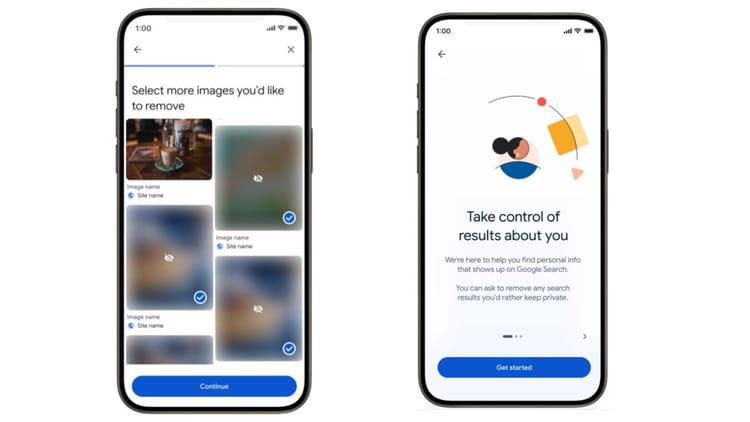
Now if objectionable photos of a person shared without consent appear in search, the process of removing them has been made easier than ever.
Remove objectionable pictures like this
- Click on the three dots given near any picture in Google Search. After this select Remove result option.
- Earlier, complaints had to be made separately for each photo, but now users can select multiple photos at once and send a request to remove them.
- Google has said in its blog that merely removing existing content is not the solution. Under the new system, users can also choose additional security options, so that objectionable results from similar searches in future can be filtered in advance.
Also read: ₹ 11 lakh stolen from woman’s account: Call came in the name of upgrading e-SIM, money was deducted as soon as OTP was shared
Removing private information becomes easier with new tool
Many times some websites secretly use your private information like e-mail, photos, videos, Aadhaar, passport, voter ID. Because of this, this information also starts appearing in Google search results, which puts your privacy at risk. Google has also simplified the process of removing it. You can now remove your personal information by following some steps:
Step 1
Open the Google app in your mobile and click on the profile icon on the top right.
Step 2
Select the Results about you option in the menu.
Step 3
Set up the monitoring profile by clicking the Get started button. Here you have to enter information like your full name, address, phone number and email.
Note that for better results, you will also be asked to add information from identification documents like Social Security Number, Passport Number or Driver’s License.
Step 4
Check the entered information carefully and confirm. Google says that this data will remain encrypted and kept safe under the company’s high-security protocols.
Step 5
After confirmation, Google will automatically scan the search results. If your personal information is found on any page, you will receive a notification through the app or email.
After this you can ask for their removal by choosing Request removal option. Users can also track the status of all their requests by visiting the Results about you hub.