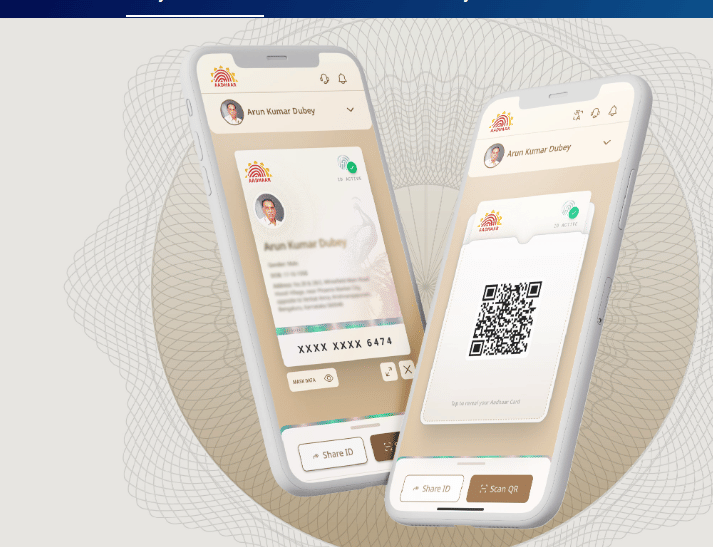
The new Aadhaar app released by UIDAI has made the user experience more digitally secure. Due to changes in the design of the app, the old settings are now contained within the new Services tab. With this new update, face authentication has now been given priority.
Process of registration in new Aadhaar app
Although the design of the app has changed, the method of registration has remained the same. After downloading the app, new users will have to complete mobile number verification and face authentication by entering the Aadhaar number. After this, the user can start using the app as soon as a PIN is set.
How to update mobile number in new Aadhaar app?
The option to update mobile number in the new app has now been shifted to the Service tab. From here the user can enter the new number and send the update request after OTP verification and face authentication. This process takes about 15 days and a fee of Rs 75 is charged.
How to update address
The option to update address is also available in the Services tab. The user can update the address in two ways. First, through electricity bill or other valid documents and second, through Aadhar card of a family member. In both cases, after face authentication and payment, the request is sent to UIDAI.
Address update from family member’s Aadhaar
If a user wants to update his address through the Aadhar card of a family member, he will have to provide the Aadhar number of that member. After this, the process of address update is completed after face authentication and payment.
Easy way to lock biometrics
This is the most important feature from security point of view. In the new app, it appears as Biometrics Unlocked right below your QR code on the home page. By clicking on this, you can lock your fingerprint and iris data in one tap, eliminating the risk of cloning or fraud.